Create the key on Kraken
Quick link: go straight to API key creation on Kraken Pro.
Key creation happens on Kraken Pro. If you start on Kraken, log in at Kraken, click your profile icon top right, choose Security then API, and Kraken sends you across to Kraken Pro.
-
Log in to Kraken Pro, click your profile icon top right and choose Settings.
-
Select the API tab.
-
Click Create API Key and give it a name.
-
Set permissions to allow:
Query Ledger EntriesQuery Open Orders & TradesQuery Closed Orders & TradesQuery FundsExport Data
-
Leave IP whitelisting off.
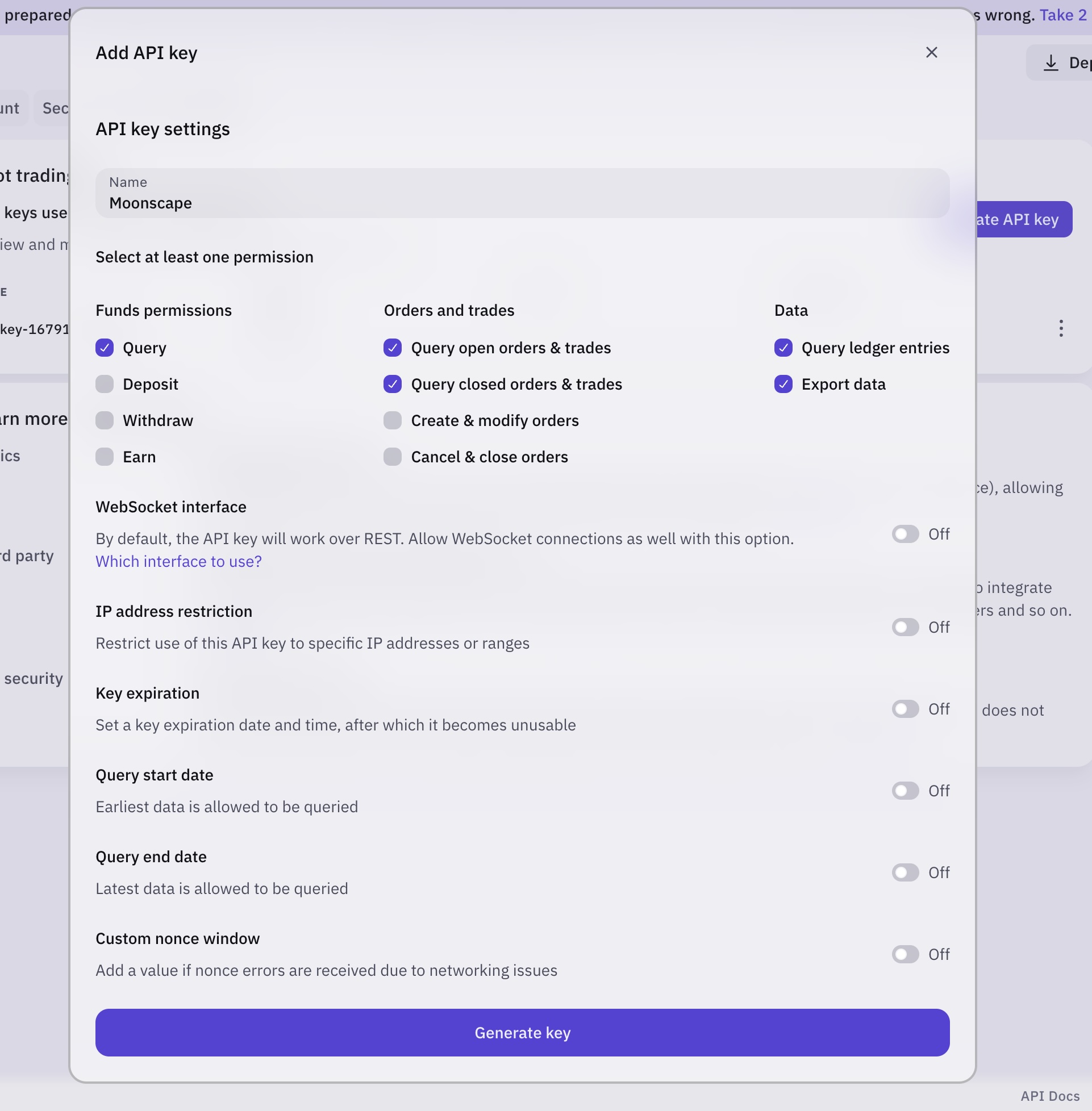
-
Click Generate key and enter your 2FA code if prompted.
-
Copy the API Key and Secret from the API list.
The Secret is shown once. Copy it before you leave the page. If you lose it you have to delete the key and create another.
Connect it in Moonscape
- Open the Moonscape web app and go to Settings.
- Under Exchange connections, click Connect exchange.
- Choose Kraken from the list.
- Paste your API key and Secret into the fields.
- Click Add.
Your transactions sync from here on, for both portfolio tracking and tax.
If something is missing
If transactions are not appearing correctly, email us and we will get them into the import. Every report shapes what we build next.